Free tool

Create a Fillable PDF Free

Upload a scan, a photo, or a flat PDF of a paper form. We straighten it, find every blank line, box, and checkbox, and give you a PDF anyone can type into.

Free with an account. 3 forms a day. No credit card. More free tools: Scan or flatten to PDF

In Short

To create a fillable PDF for free, upload a scan, a photo, or a flat PDF of a paper form and select Find the fields. Every blank line, box, and checkbox becomes a field named after the words next to it. Fix anything on the page, then download a PDF anyone can type into. Free with an account: 3 forms a day, up to 5 pages each.

How It Works

How to Create a Fillable PDF From a Paper Form

  1. Upload the form. A scan, a phone photo, or a flat PDF. Photos are straightened, cropped, and whitened first.
  2. Find the fields. Select Find the fields. Our field detection model marks every blank line, box, and checkbox, and names each one from the words printed next to it.
  3. Check and fix. Drag a box to move it, pull its corner to resize it, or right-click it to rename or delete it. Missed a field? Add a text field or a checkbox.
  4. Download the fillable PDF. Type into it first if you like, then download a PDF that works in standard PDF readers.
A Real Example

A Phone Photo, Made Fillable in One Step
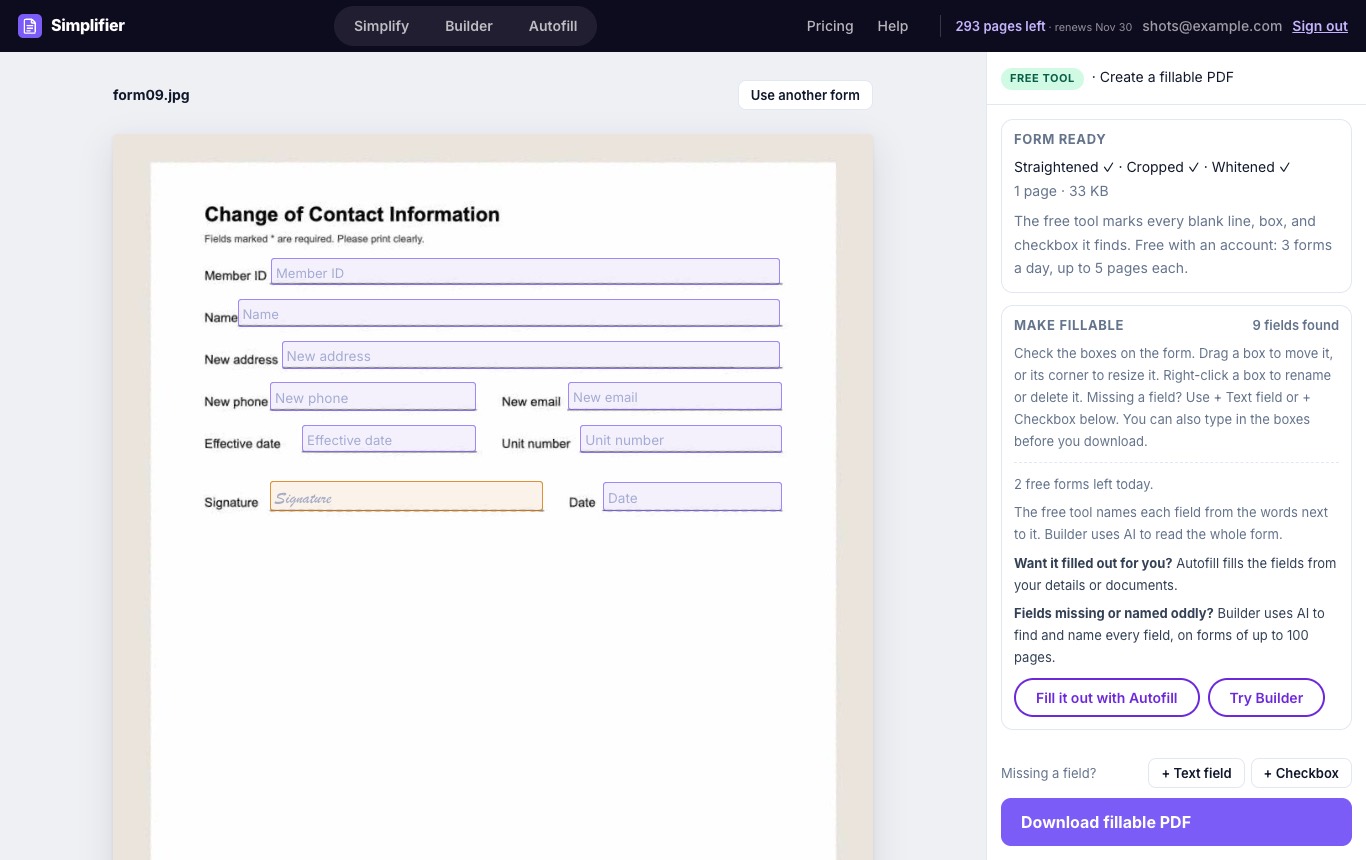
The free fillable PDF tool showing a change of contact information form with 9 fields found: member ID, name, address, phone, email, effective date, unit number, signature, and date
A photo of a paper form with 9 fields found and named for free.
Free vs. Builder

The Free Tool or Builder?

Both turn a paper form into a PDF anyone can type into. The difference is how the fields are found and named.

Create a Fillable PDF (free)Builder
Finding the fieldsOur field detection modelThe same model. If it cannot read a page, AI (Claude) finds the fields itself
Naming the fieldsFrom the words printed next to each fieldAI reads the whole form and names each field, sets its type (date, phone, number) and marks required fields
Hard formsMay miss fields or give rough names on dense or unusual layoutsBuilt for dense forms and unusual layouts
LengthUp to 5 pagesUp to 100 pages
How often3 forms a dayUses the pages in your plan
PriceFree with an accountSubscription

Need More Than a Fillable Form?

Take the same form to a paid tool without uploading it again.

Common Questions

Yes. With a free Simplifier account you can make 3 forms a day fillable, each up to 5 pages, with no credit card. If no fields are found, the form does not count.
Scanned forms, photos of paper forms, and flat PDFs with blank lines, boxes, and checkboxes. Photos are straightened and cleaned first.
Add it with + Text field or + Checkbox, and move, resize, rename, or delete any field on the page. For dense forms, Builder uses AI to find and name every field.
Yes. The download is a standard fillable PDF, so it can be filled out in standard PDF readers and browsers.
Both use our field detection model to find the fields. The free tool names each field from the words printed next to it. Builder adds AI (Claude) that reads the whole form to name each field, set its type, and mark required fields, and that finds the fields itself on pages the model cannot read. Builder handles forms of up to 100 pages.
No. The form is deleted as soon as the fields are found. What you type into the fields stays in your browser.

Make Your Form Fillable Now

Free with an account. 3 forms a day.