Simplify

Summarize and Explain a PDF in Plain English

Upload a PDF or a photo of a document. Simplify puts a numbered note beside each part, sums it up in a few lines, and answers your questions from the document.

Every plan starts with a free trial. Cancel anytime.

In Short

To summarize a PDF with AI, upload it to Simplify. You get the clean page with each section framed and numbered, a plain-English note beside each one, and an In short summary of the dates, amounts, and deadlines it states. You can also have the whole text rewritten in plain words, get a longer summary, or ask a question. Notes take about 10 seconds a page.

A Real Example

Notes Beside Every Part of the Page

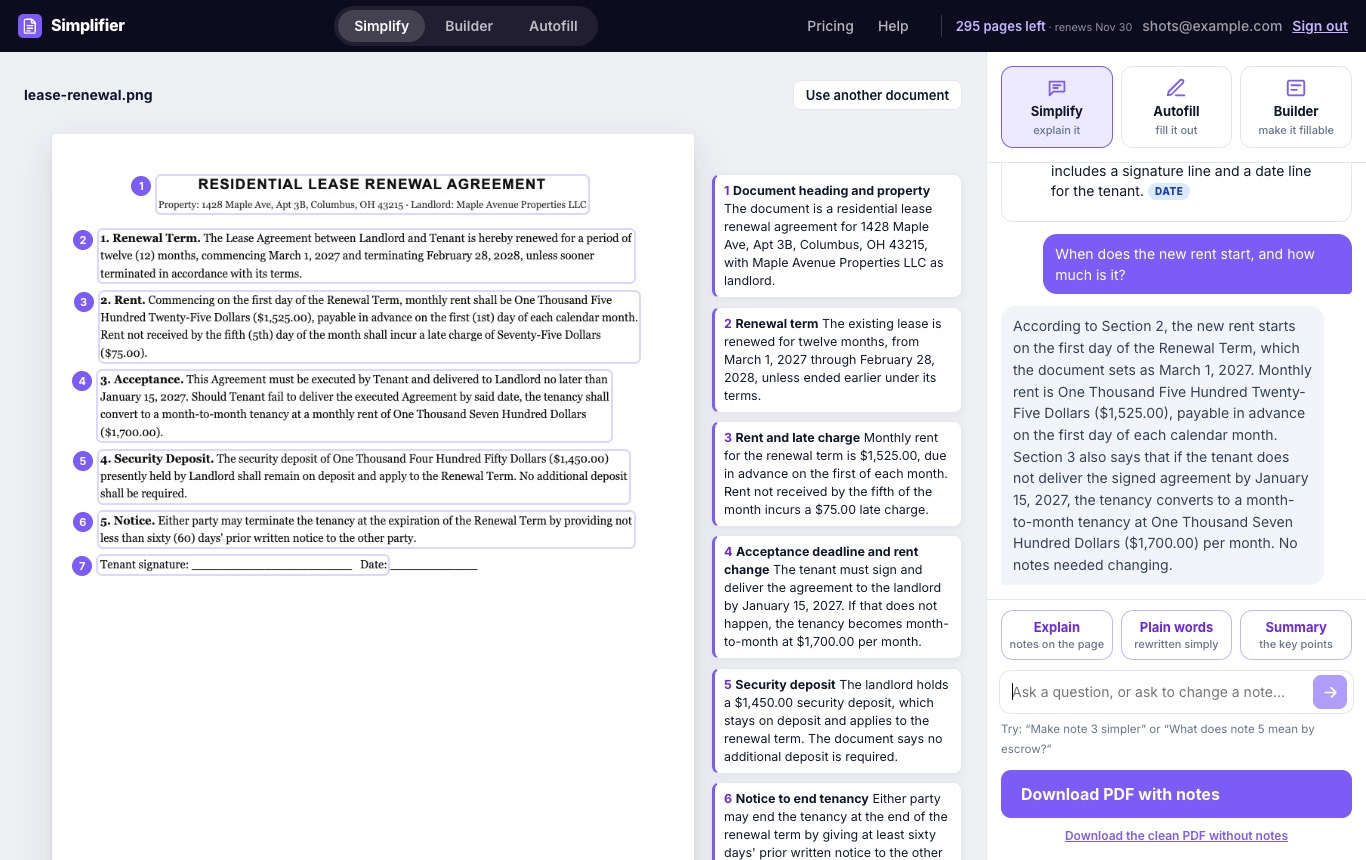
A one-page lease renewal, explained part by part, and a question about it.
Simplify showing a lease renewal with seven numbered sections and a plain-English note beside each one, with dates, amounts, and deadlines tagged
Seven numbered notes, with dates, amounts, and deadlines tagged.
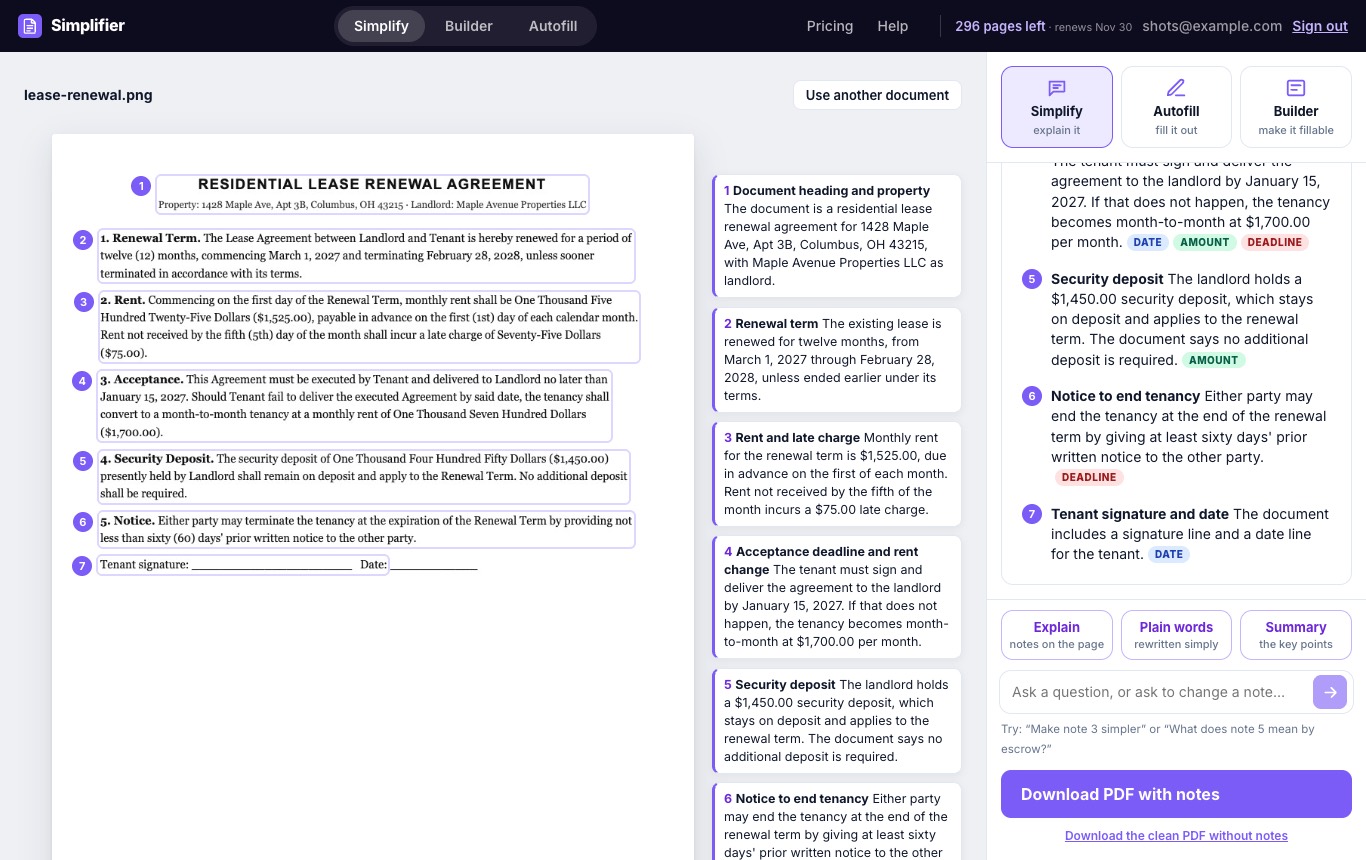
Simplify answering the question When does the new rent start, and how much is it, from Section 2 of the lease
A question in the chat, answered from the section it comes from.
What It Does

A PDF Summarizer That Explains Each Part

The document stays in front of you. The explanations sit right next to it.

Notes on the page

Each section is framed and numbered, with a short plain-English note beside it. Dates, amounts, and deadlines are tagged so they stand out.

In short

The whole document in a sentence or two: what it is, and the dates, amounts, and deadlines it states.

Plain words and Summary

Get the whole text rewritten in clear, everyday language, or a longer list of the key points.

Questions

Ask "What is the deadline?" or "Make note 3 simpler", and get an answer drawn from the document, or a rewritten note.

How It Works

How to Summarize a PDF with Simplify

  1. Upload the document. A PDF, a scan, or a photo. Simplify straightens, crops, and whitens photos, and shows the clean page.
  2. Select Explain. Numbered notes appear beside each part of the page, with an In short summary at the top. Plain words and Summary are one click away.
  3. Ask about anything unclear. Type a question in the chat. The answer points to the section it comes from.
  4. Keep the result. Download a PDF with the notes in the margins, or the clean pages.
Notes, Summary, or Plain Words?

Pick the View That Fits the Document

Want to go deeper? Read how to simplify a PDF and how to summarize a long document.

Who It's For

Made for the Paperwork Nobody Enjoys

Before a meeting

Long reports and briefing papers: get the key points and dates first.

When the manual is too dense

Instructions, specifications, and technical documentation explained in plain language.

When the letter is too long

Notices, announcements, and long emails restated in a few clear sentences.

Works With the Rest of the Suite

Pass the same document to another tool without uploading it again.

Common Questions

PDFs, and scans or photos of paper documents. Photos are straightened and cleaned first. It works best on documents with clear, readable text.
Notes on the page work on documents up to 20 pages. Summary and Plain words work on PDFs up to 100 pages. Files can be up to 30 MB.
Notes, Summary, and Plain words use one page of your plan for each page of the document. Each question uses one page, whatever the length of the document.
Yes. Ask in the chat, for example "Make note 3 simpler", and the note is rewritten on the page.
Yes. Download a PDF with the numbered notes in the margin beside each page, or the clean pages without notes.
No. Simplify restates what a document says, to help you understand it. It is not legal, medical, financial, or tax advice. For decisions that matter, check with a qualified professional.
No. Your document is sent to our AI provider to produce the result, and Simplify does not keep a copy after that. See the Privacy Policy.

Try Simplify on Your Next Document

Every plan starts with a free trial. Cancel anytime.